
Acer Chromebase 24
Updated on

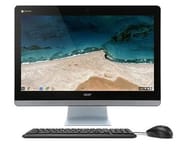
The Acer Chromebase 24 was announced in January 2016 at CES and started shipping in the summer of 2016. It builds on the features of the original 21” Acer Chromebase with a bigger screen and overall better appearance. The Chromebase 24 uses Intel processors instead of the NVIDIA Tegra K1 found in earlier models.
This is an all-in-one desktop in the shape of an Apple iMac, at a list price starting at $429.99 compared to over $1000 for a bottom of the line iMac. It is not the high-end machine you would expect from Apple. It is enough machine for anyone who wants a second desk setup for surfing the Internet and doing basic tasks.
The 24” IPS display has received good reviews online, with the only complaint being a relatively large amount of glare. Built in speakers along the front edge provide decent sound. The back and side carry an HDMI out, Ethernet, headphone jack, SD card slot, and plenty of USB ports. Overall speed is decent even with the lower end Celeron processors.
Related Videos
Acer Chromebase 24 Comparison Chart
 Acer Chromebase 24 | Acer Chromebase 24 | |
| Price | List Price: $429.99 Amazon Prices: | List Price: $499.99 Amazon Prices: |
| Model number | CA24I-CN / DQ.Z0EAA.001 | CA24I-CT / DQ.Z0DAA.001 |
| Performance Rating | 2.3 | 2.3 |
| Chromebook Plus | No | No |
| Processor | Dual-core 1.70 Ghz Intel Celeron 3215U | Dual-core 1.70 Ghz Intel Celeron 3215U |
| RAM | 4 GB | 4 GB |
| Internal Storage | 16 GB | 16 GB |
| Screen Size | 23.8" | 23.8" |
| Screen Resolution | 1920x1080 | 1920x1080 |
| Screen Type | IPS | IPS |
| Touch Screen | No | Yes |
| Stylus / Pen | No Stylus Support | No Stylus Support |
| Dimensions width x length x thickness | 22.9 x 15.8 x 1.4 inches (581.66 x 401.32 x 35.56 mm) | 22.9 x 15.8 x 1.4 inches (581.66 x 401.32 x 35.56 mm) |
| Weight | unknown | unknown |
| Backlit Keyboard | No | No |
| Webcam | HD | HD |
| WiFi | 802.11 a/b/g/n/ac | 802.11 a/b/g/n/ac |
| Bluetooth | Bluetooth 4.0 | Bluetooth 4.0 |
| Ethernet | Yes | Yes |
| Cellular Modem | No | No |
| HDMI | Full-Size HDMI | Full-Size HDMI |
| USB Ports | 1 USB 2.0, 3 USB 3 | 1 USB 2.0, 3 USB 3 |
| Thunderbolt Ports | No | No |
| Card Reader | SD | SD |
| Battery | No Battery | No Battery |
| Battery Life | 0.0 hours | 0.0 hours |
| Fanless | No | No |
| Auto Update Expiration Date | June, 2021 | June, 2021 |
Related Chromebooks
-
 Acer Chromebook 311 (AMD)The Acer Chromebook 311 (CB311-10H) is an 11.6-inch ChromeOS laptop on an AMD A4-9120C with 4GB of…
 -
 Acer Chromebook 315The Acer Chromebook 315 (CB315-4H) is a fanless 15.6-inch FHD IPS Chromebook with an Intel Celeron…
 -
 ASUS Chromebook C203XAThe ASUS Chromebook C203XA is a rugged 11.6-inch education laptop with a MediaTek MT8173C, an…
 -
 ASUS Chromebook C403The ASUS Chromebook C403 is a fanless 14-inch education Chromebook with an anti-glare 1366x768…
 -
 HP Chromebook 14 (AMD)The HP Chromebook 14 (AMD) is a fanless 14-inch Chromebook built on the AMD A4-9120C APU with…
 -
 HP Chromebook 11a (ARM)The HP Chromebook 11a offers an 11.6-inch anti-glare display, 720p HD webcam, and up to 15 hours of…
A 1080p IPS panel, a Celeron, and a full spread of ports
Acer built this all-in-one in 2016 around a 23.8-inch Full HD IPS panel with 178-degree viewing angles, which works for one person at the desk or a few people gathered around it. Display brightness tops out at 250 nits, enough for indoor rooms, though the glossy panel picks up reflections and glare. The 1080p resolution was standard for the time and drew some criticism from users accustomed to higher pixel densities on smaller screens.
The Intel Celeron 3215U processor handles everyday Chrome OS work. Chrome Unboxed’s review noted consistent Octane benchmark scores just over 16,000, allowing the device to handle multiple tabs, Google Docs collaboration, and HD video streaming without noticeable slowdowns. Boot times were quick at under six seconds, and Chrome OS’s efficient RAM management meant the 4GB of memory rarely became a bottleneck during typical usage scenarios.
The aluminum stand holds the screen steady without wobbling, and its tilt adjusts from 5 to 30 degrees. The webcam can be positioned separately from the screen tilt angle. The bundled keyboard and mouse feel cheap and plasticky next to the main unit. Connectivity covers three USB 3.0 ports, one USB 2.0 port, a full-size SD card reader, HDMI output for external displays, Gigabit Ethernet, and 802.11ac Wi-Fi.
Audio hardware is what pushed the machine into educational environments. EdTech Magazine’s review highlighted the four-microphone array, which could clearly capture questions from 45 feet away for video conferencing and distance learning applications. VESA mount compatibility allowed for flexible installation options in classrooms and libraries, while the simple Chrome OS interface reduced IT support requirements compared to traditional Windows-based systems.
Reviewer Insights
A week of daily use ended in a recommendation
Robby Payne of Chrome Unboxed characterized the device as “an exercise in safety” noting that while it doesn’t take risks or offer groundbreaking innovation, it also has very few misses. After using the Chromebase exclusively for a week, he found it “really good” at the $429 price point, praising its consistent performance and solid construction. His closing line was “I highly recommend it. It’s been very good and I’ve enjoyed having it here in the office.” The review also noted the device can drive external QHD monitors through the HDMI output, which helps anyone who needs more screen real estate.
Four microphones made it a video conferencing tool for campuses
The four-microphone array drew the most attention from John Breeden II at EdTech Magazine, who reviewed the machine from a higher education standpoint. He wrote that Acer “optimized it for video, making this a high-performing, inexpensive video conferencing tool,” and treated the device as both an individual workstation and telelearning equipment. Breeden concluded that the Chromebase “would be a good choice for almost any institute of higher learning” given its affordable pricing and comprehensive features for educational settings.
A CES hands-on read it as a cloud-only machine
At CES 2016, Chris Burns of SlashGear called it “one of the biggest Chrome devices we’ve yet come across” and positioned it as the first Chromebase with an Intel Core processor. He put the appeal plainly: “the beauty in this device is in its simplicity. If you don’t need to do anything offline, this base is a fine place to do it.”
A dependable cloud desk machine that stopped getting updates in 2021
Production ran from 2016 to 2021 at a $429 starting price. The device did well in educational and small business environments, where its video conferencing capabilities, simple Chrome OS interface, and automatic security updates proved valuable, and at home it covered web browsing, email, and document editing. Updates stopped at its June 2021 end-of-life date, so anything it does today happens without security patches.
If you are shopping for a Chrome OS device today, our Chromebook Comparison Chart lets you filter and sort current models side by side.
Frequently Asked Questions
Can the RAM or storage be upgraded on the Acer Chromebase 24?
No. The 4GB RAM and 16GB internal storage are soldered to the motherboard. You can expand storage with external USB drives or SD cards, and Chrome OS leans on cloud storage through Google Drive anyway.
Is the Acer Chromebase 24 still receiving Chrome OS updates?
No, the Acer Chromebase 24 reached its end-of-life in June 2021 and no longer receives Chrome OS updates or security patches. The device will continue to function, but it is not recommended for users who require ongoing security updates or new Chrome OS features.
Can the Acer Chromebase 24 be wall-mounted?
Yes. The stand detaches and the chassis is VESA mount compatible with a 100x100mm pattern, which suits classrooms, offices, libraries, or home setups where desk space is limited.
Does the Acer Chromebase 24 have a touchscreen?
The base model (CA24I-CN) does not include a touchscreen. Acer offered a touchscreen variant (CA24I-CT) at $499.99, and that variant shares all other specifications with the standard model.
What external displays can the Acer Chromebase 24 support?
The HDMI output can drive an external display. Chrome Unboxed’s review confirmed it can successfully power QHD (2560x1440) external monitors, which extends the workspace beyond the built-in 24-inch screen.
How does the Acer Chromebase 24 compare to the original 21-inch Chromebase?
The original 21-inch Acer Chromebase ran an NVIDIA Tegra K1; the Chromebase 24 moved to an Intel processor and a 23.8-inch IPS panel. It also added USB 3.0 ports and an aluminum stand.