
Acer Chromebook 712
Updated on

The Acer Chromebook 712 pairs a 12-inch 3:2 IPS display with an Intel Celeron 5205U and a chassis built for school carts. Google supports the platform until 2030, so a device bought for a classroom keeps receiving updates for years. Ports cover USB Type-C, USB Type-A, and microSD, and the line shipped with 4GB or 8GB of RAM alongside 32GB or 64GB of storage.
| Pros | Cons |
|---|---|
| MIL-STD 810G durability survives 48-inch drops (EdTech Magazine testing) | Lower HD+ resolution (1366x912) limits screen sharpness |
| 330ml spill-resistant keyboard with drainage system (Chrome Unboxed) | $329 list price lands on the slowest chip in the line |
| Celeron 5205U is 10th-gen Comet Lake, a tier above Apollo Lake EDU silicon | No touchscreen on the base model |
| 3:2 aspect ratio provides 18% more vertical space for productivity | Ruggedized shell pushes the weight to 3.31 lbs |
| Pick-resistant mechanically-anchored keys prevent student tampering | Keyboard is not backlit for low-light use |
| Google support until June 2030 keeps a deployed fleet patched for years | Limited to 4GB RAM in base configuration |
Related Videos
Acer Chromebook 712 Comparison Chart
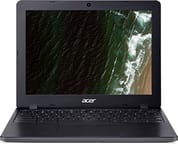 Acer Chromebook 712 | |
| Price | List Price: $329.99 Amazon Prices: Loading prices... |
| Model number | C871-C85K / NX.HQEAA.001 |
| Performance Rating | 3.1 |
| Chromebook Plus | No |
| Processor | Dual-core 1.90 Ghz Intel Celeron Processor 5205U |
| RAM | 4 GB |
| Internal Storage | 32 GB eMMC |
| Screen Size | 12" |
| Screen Resolution | 1366x912 |
| Screen Type | IPS |
| Touch Screen | No |
| Stylus / Pen | No Stylus Support |
| Dimensions width x length x thickness | 11.7 x 9 x 0.85 inches (297.18 x 228.6 x 21.59 mm) |
| Weight | 3.31 lbs (1.5 kg) |
| Backlit Keyboard | No |
| Webcam | 720p HD |
| WiFi | IEEE 802.11 a/b/g/n/ac/ax |
| Bluetooth | Bluetooth 5.0 |
| Ethernet | No |
| Cellular Modem | No |
| HDMI | No HDMI |
| USB Ports | 1 USB 3, 2 USB-C (supports DisplayPort) |
| Thunderbolt Ports | No |
| Card Reader | microSD Card Reader |
| Battery | 3 cell, Lithium-ion |
| Battery Life | 12.0 hours |
| Fanless | Yes |
| Auto Update Expiration Date | June, 2030 |
Related Chromebooks
-
 Acer Chromebook 311 C723The Acer Chromebook 311 C723 is an 11.6-inch education Chromebook built to MIL-STD-810H durability,…
 -
 Acer Chromebook 311 (CO731)The Acer Chromebook 311 (CO731) is a fanless 11.6-inch Chromebook with an Intel Celeron N4500, 4GB…
 -
 Samsung Chromebook 4The Samsung Chromebook 4 is an 11.6-inch Celeron N4000 or N4020 Chromebook with 4GB of RAM, a…
 -
 Lenovo Flex 3i Chromebook 12.2"The Lenovo Flex 3i Chromebook 12.2 is a fanless 2-in-1 with a 12.2-inch 1920x1200 IPS touchscreen,…
 -
 ASUS Chromebook CR11 (CR1104C)The ASUS Chromebook CR11 (CR1104C) is a ruggedized 11.6-inch Chromebook built for students and…
 -
 Dell Chromebook 11 (3100)The Dell Chromebook 11 (3100) is a ruggedized 11.6-inch education Chromebook with rubber bumpers, a…
A chassis rated for 48-inch drops and 130 lbs of pressure

Mechanically anchored keys resist picking, so students cannot pry them off the deck. A gutter system routes water spills up to 330ml out the bottom of the chassis, and the trackpad resists moisture from spills and damp hands. The chassis also holds up under 130 lbs of downward pressure, a rating Chrome Unboxed checked by hand. Teachers managing these devices should know about the Chromebook magnet trick, a harmless prank where students place magnets on classmates’ Chromebooks to trigger the lid sensor and put them to sleep.
Drop testing covered heights up to 48 inches on every edge and corner, and the shell carries a MIL-STD 810G rating for sand, dirt, dust, humidity, and temperature extremes. The reinforced hinge design extends to the top of the screen, so the machine survives being picked up and held horizontally by the display alone. Rubberized bumpers ring the chassis to absorb the drops and knocks of daily student use.
The Celeron 5205U here is 10th-generation Comet Lake silicon rather than the cheaper Apollo Lake or Gemini Lake parts that fill most education Chromebooks. That leaves headroom for multitasking and heavier web applications. EdTech Magazine ran 3D modeling in SketchUp Free without trouble and finished a 30-second WeVideo edit, transitions and effects included, in less than five minutes. The 3:2 IPS display shows 18% more vertical space than a 16:9 panel, so document-heavy schoolwork fits more text on screen and scrolls less.
Reviewer Insights

Chrome Unboxed stood on it and the keys stayed put
Robby Payne from Chrome Unboxed had a staff member stand on the 712 to test its 130 lbs downward force rating, and the device passed with no issues. He attempted to remove the specially-anchored keys multiple times and declared that “whatever magic they’ve got going on with the way that the keys are attached to the keyboard, there’s just no way to get anything under there.” The review praised the decision to use Comet Lake processors instead of typical budget EDU chipsets, noting that “Acer’s made the choice to go with Comet Lake processors instead of the standard low-end Intel chipsets.” His overall conclusion was enthusiastic: “It looks like Acer has a winner on its hands.”
Chrome Unboxed also published a detailed written review describing the device as possibly “kid-proof.” They noted that “Acer has managed to possibly build a kid-proof Chromebook” and that “the Acer Chromebook 712 packs in more ruggedness and durability than any Chromebook we’ve ever seen.” The review tied the $329.99 starting price to Google’s 8-year auto-update policy as a long-term purchase for schools.
EdTech Magazine put it through a classroom term
Buzz Garwood from EdTech Magazine tested the 712 in real classroom use, dropping it from 48 inches and pouring 10 ounces of water over the keyboard. The device continued functioning normally after both tests. On 3D modeling software, Garwood found that “Performance was as smooth and fluid as a desktop application.” For video editing, he reported “I completed a 30-second video in less than five minutes with transitions and effects.” The review praised the 3:2 aspect ratio display for reducing scrolling needs and the 180-degree opening that allows flat positioning for student collaboration.
Legit Reviews on the Celeron-to-i3 ladder
Shane McGlaun from Legit Reviews described the Chromebook 712 as “a solid Chromebook for parents needing something that can stand up to kids or for schools looking for something for students.” McGlaun highlighted the processor options spanning Intel Celeron 5205U to Core i3-10110U, so a school could pick a performance tier to fit its budget. The forward-looking Wi-Fi 6 dual-band support, multiple USB-C ports, and child safety certifications demonstrate Acer’s focus on real-world student usage scenarios. There is no built-in Ethernet port, though the USB ports support a USB Ethernet adapter for wired networking in lab environments.
Customer Reviews
Across 4 ratings on Amazon, the Acer Chromebook 712 averages 3.6 stars, so the sample is small and the scores are split: most are 4 or 5 stars, but roughly a third land at one star. The handful of written reviews that are available are positive and focus on speed, screen, and durability. A verified buyer named JG, who switched from a Dell 3100 after spilling water on it, wrote that this model has “a bit faster newer cpu in a 11-12 inch frame” and added “I like the screen better than the last two Chromebooks I’ve had. I also like the speed as well as the as the speakers,” noting that most Chromebooks he had used had speakers that “can be drowned out easily.” A reviewer named Francis hall (not a verified purchase) called it durable: “typing on this device is great, very durable, perfect for my use” and “its been a workhorse and i love my chromebook.”
Read more owner reviews on Amazon.
Who the 712 still fits
MIL-STD 810G certification, 330ml of spill resistance, pick-resistant keys, and a 130 lbs pressure rating add up to a machine that survives what students put a laptop through. The 10th-generation Comet Lake silicon gives educational web applications more room than the Apollo Lake and Gemini Lake parts it replaced, and the 12-hour battery rating covers a full day of classes without a hunt for an outlet.
Google support runs to June 2030. The 712 launched at $329.99 in early 2020, and while new units are now scarce on consumer retail (Amazon inventory has dwindled to used or refurbished stock), education resellers and school IT channels still source these for fleets that need a few more years out of an AUE-locked deployment. A family shopping for a single laptop is better served by a model with a longer support window and a sharper panel than the 1366x912 screen here. Schools weighing multiple options can use the Chromebook Comparison Chart to evaluate the 712 alongside current models side by side.
Frequently Asked Questions
When does the Acer Chromebook 712 stop receiving Chrome OS updates?
Google’s Auto Update Expiration database lists the Chromebook 712 (C871 and C871T) as supported through June 2030, covering automatic Chrome OS releases and security patches.
How rugged is the Chromebook 712 in real classroom testing?
Acer rates the chassis to MIL-STD 810G with drop survival from 48 inches, 130 lbs of downward pressure, and 330ml of spill resistance through a drained keyboard tray. Chrome Unboxed verified the pressure spec by having a staff member stand on the device with no damage, and EdTech Magazine poured 10 ounces of water across the keyboard during their hands-on review without functional failure.
Which processors does the Acer Chromebook 712 ship with?
The 712 line uses Intel 10th-gen Comet Lake silicon across the board, with SKUs spanning the Celeron 5205U on the base C871-C85K covered here through the Core i3-10110U on higher-tier school configurations. Legit Reviews called out that Celeron-to-i3 ladder as a reason the line suited a wide range of school budgets.
Why does the 712 use a 3:2 aspect ratio instead of 16:9?
The 1366x912 panel carries roughly 18% more vertical pixels than a 1366x768 widescreen display, which Acer pitched as a productivity gain for document work and worksheets. The IPS panel also keeps viewing angles wide enough for two students to share a screen during group work.
Can I upgrade the RAM or storage on the Chromebook 712?
No. The 4GB or 8GB of LPDDR4 memory and the 32GB or 64GB of eMMC storage are both soldered to the board, as they are on sealed education Chromebooks generally. A microSD card is the only way to add local file storage, and Google Drive covers the rest.
Does the base Chromebook 712 come with a touchscreen?
The C871 base model ships with a non-touch panel. Acer built a separate C871T variant for schools that want touch input on the same rugged chassis; the rest of the spec sheet matches aside from the digitizer layer.
Is the Acer Chromebook 712 still worth buying in 2026?
For a school adding to an existing C871 fleet, yes. The chassis is as rugged as it was at launch and Chrome OS support holds through June 2030, which keeps the machine managed alongside the rest of the deployment. For a fresh consumer purchase in 2026, a newer Chromebook with a longer AUE window is the better long-term buy.