
Acer Chromebook 15 CB3-532
Updated on

Note: The Acer Chromebook 15 CB3-532 reached its Auto Update Expiration in June 2022 and no longer receives Chrome OS updates. While still functional for basic tasks, we recommend considering a newer Chromebook for continued security updates and feature improvements.
Acer shipped the Chromebook 15 CB3-532 in 2016 with a 15.6-inch display and a price around $199. The Intel Celeron N3060 and 4GB of RAM inside set a low ceiling on speed, and the appeal sat in the screen size and the battery instead. One configuration, the CB3-532-108H, carries an Intel Atom x5-E8000 in place of the Celeron. For students and families who needed a browser and Google Docs, that combination bought a lot of screen for the money.
Related Videos
Acer Chromebook 15 CB3-532 Comparison Chart
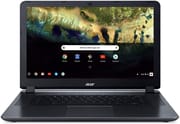 Acer Chromebook 15 CB3-532 | Acer Chromebook 15 CB3-532 | Acer Chromebook 15 CB3-532 | |
| Price | List Price: $229.99 Amazon Prices: | List Price: $229.99 Amazon Prices: | List Price: $229.99 Amazon Prices: |
| Model number | CB3-532-C4ZZ / NX.GHJAA.008 | CB3-532-108H / NX.GHJAA.016 | CB3-532-C42P / NX.GHJAA.004 |
| Performance Rating | 2.4 | 2.4 | 2.4 |
| Chromebook Plus | No | No | No |
| Processor | Dual-core 1.60 Ghz (max 2.48 Ghz) Intel Celeron Processor N3060 | Quad-core 1.04 Ghz (max 2.00 Ghz) Intel Atom x5-E8000 Processor | Dual-core 1.60 Ghz (max 2.48 Ghz) Intel Celeron Processor N3060 |
| RAM | 4 GB | 4 GB | 4 GB |
| Internal Storage | 32 GB eMMC | 16 GB eMMC | 16 GB eMMC |
| Screen Size | 15.6" | 15.6" | 15.6" |
| Screen Resolution | 1366x768 | 1366x768 | 1366x768 |
| Screen Type | LED-backlit | LED-backlit | LED-backlit |
| Touch Screen | No | No | No |
| Stylus / Pen | No Stylus Support | No Stylus Support | No Stylus Support |
| Dimensions width x length x thickness | 15.1 x 10.1 x 0.95 inches (383.54 x 256.54 x 24.13 mm) | 15.1 x 10.1 x 0.95 inches (383.54 x 256.54 x 24.13 mm) | 15.1 x 10.1 x 0.95 inches (383.54 x 256.54 x 24.13 mm) |
| Weight | 4.3 lbs (1.95 kg) | 4.3 lbs (1.95 kg) | 4.3 lbs (1.95 kg) |
| Backlit Keyboard | No | No | No |
| Webcam | 1280x720 | 1280x720 | 1280x720 |
| WiFi | 802.11 a/b/g/n/ac | 802.11 a/b/g/n/ac | 802.11 a/b/g/n/ac |
| Bluetooth | Bluetooth 4.2 | Bluetooth 4.2 | Bluetooth 4.2 |
| Ethernet | No | No | No |
| Cellular Modem | No | No | No |
| HDMI | Full-Size HDMI | Full-Size HDMI | Full-Size HDMI |
| USB Ports | 2 USB 3 | 2 USB 3 | 2 USB 3 |
| Thunderbolt Ports | No | No | No |
| Card Reader | SD/SDXC | SD/SDXC | SD/SDXC |
| Battery | 3 cell, 3950 mAh, Li-Polymer | 3 cell, 3950 mAh, Li-Polymer | 3 cell, 3950 mAh, Li-Polymer |
| Battery Life | 12.0 hours | 12.0 hours | 12.0 hours |
| Fanless | No | No | No |
| Auto Update Expiration Date | June, 2022 | June, 2022 | June, 2022 |
Related Chromebooks
-
 Acer Chromebook 315 (CB315-5H/5HT)A budget-friendly 15.6-inch Chromebook with Intel N100 processor, FHD IPS display, WiFi 6E, and…
 -
 Acer Chromebook 315The Acer Chromebook 315 (CB315-4H) is a fanless 15.6-inch FHD IPS Chromebook with an Intel Celeron…
 -
 ASUS Chromebook C523The ASUS Chromebook C523 is a fanless 15.6-inch Chromebook with an anti-glare display, an Intel…
 -
 ASUS Chromebook CX1 (CX1500)The ASUS Chromebook CX1 (CX1500) is a 15.6-inch full HD Chromebook with a number pad, an Intel…
 -
 Lenovo 3i ChromebookThe Lenovo 3i Chromebook offers a large 15.6-inch anti-glare FHD display with a numeric keypad,…
 -
 Lenovo IdeaPad 3i ChromebookThe Lenovo IdeaPad 3i Chromebook is a 15.6-inch Full HD Chromebook with an Intel Celeron N4500 and…
A big screen on slow silicon
The granite gray chassis has a woven, textured finish that grips better than glossy plastic and hides fingerprints reasonably well. At 4.3 pounds and 0.95 inches thick, it sits on a desk more comfortably than it rides in a backpack. The keyboard deck and display lid show no alarming flex, though the plastics feel a step below Acer’s higher-end Chromebook 14. Ports run to USB 3.0, HDMI, and an SD card reader, so wired internet meant adding a USB Ethernet adapter.
The Intel Celeron N3060 dual-core handles email, Google Docs, and light web browsing, then bogs down once you open more than a few tabs or try to multitask. 9to5Google noted that scrolling around pages felt noticeably slower than on other Chromebooks, and Technically Well found that “performance can stutter even when loading just one ad- and javascript-heavy website.” The 16GB or 32GB of eMMC storage fills up quickly with offline files, and the included 100GB of Google Drive storage is the intended answer to that.
The 15.6-inch panel makes spreadsheets, documents, and web pages easier to read for anyone with vision concerns. At 1366x768 the text and images look soft next to higher-resolution displays, and the TN panel narrows viewing angles. 9to5Google found that “at 50%, things are way too dim,” pushing the brightness slider up for comfortable indoor use. TechRadar instead listed an “absolutely radiant” display among its pros.
Acer advertises 12 hours of runtime, and measured figures land in the 8-12 hour band depending on brightness and workload. A school or work day fits inside that without a charger, and that endurance buys back some of the weight penalty.
Reviewer Insights
Dr Earbuds called it too slow to recommend
Dr Earbuds / Tech 4 Networkers offered a strongly negative assessment of the CB3-532, advising viewers not to purchase it even on sale. In his hands-on review, he characterized it as a “15.6 inch behemoth” that feels outdated, stating that “this screen puts you back where Chromebook first came out. That’s a problem; the screen is an issue.” He praised the keyboard as decent and noted the attractive design, but found the trackpad mushy, the speakers hollow, and the overall package too heavy for practical use. His verdict was clear: “Don’t buy this Acer Chromebook 15. I don’t even care if they have a sale… this Chromebook is… a couple of years behind.”
Ricardo Gardener on Chrome OS for newcomers
Ricardo Gardener (BlogTechTips) walked newcomers through Chrome OS fundamentals and flagged the limits along the way. He noted that “Chrome OS is quite fast” and ran through the spec sheet, including its up to 12 hours of battery life. However, he warned that “16 gigabytes is used up very, very fast” and that the device is heavily dependent on internet connectivity. His ultimate advice: “If you know what it is and know its limitations you’ll be fine.”
PC Mag and Computer Shopper
NotebookCheck aggregates two reviews that both scored the CB3-532 at 80%. PC Mag, whose Editors’ Choice was the pricier Acer Chromebook 14, concluded that “you might be giving up style, but in return you’ll get a bigger screen and absurdly long battery life while only paying $200.” Computer Shopper matched that 80% score, noting that “for $199, we’re happy to live with its shortcomings in order to be able to afford one (or even two) extra Internet devices.”
9to5Google
9to5Google described the CB3-532 as “a big, but not so powerful Chromebook which is aimed at those who need a large, affordable machine.” The reviewer ultimately gifted the device to his parents, identifying them as the ideal target market: basic users comfortable with web browsing, email, and light document creation who prioritize screen size and affordability over performance. The review praised the keyboard and trackpad for typing tasks while noting the dim display and slow scrolling as significant drawbacks.
A big-screen bargain that ran out of updates in June 2022
At launch the CB3-532 traded speed and display quality for the largest screen Acer could fit under $250 with all-day battery, and for students and budget-conscious families that math worked.
Its June 2022 Auto Update Expiration has passed, so no further Chrome OS security updates arrive. The machine still boots and still runs the basics, so an owner can keep it around for light document work as long as the missing patches are understood. Chromebooks sold now pair faster processors and sharper displays with years of remaining support at similar or only slightly higher prices than the 2016 asking figure. Our Chromebook comparison chart lets you sort and filter current models by screen size, price, and specs to find a good fit.