
Lenovo Chromebook S340
Updated on

The Lenovo Chromebook S340 was an entry-level 14-inch Chromebook designed for students, home users, and anyone needing a straightforward device for everyday web-based tasks. Powered by the Intel Celeron N4000 processor from Intel’s Gemini Lake generation with 4GB of RAM, this budget notebook prioritized portability and all-day battery life over raw computing power. Released in 2019 alongside its convertible sibling the Lenovo Chromebook C340, the S340 took a traditional clamshell approach while retaining a touchscreen display. With its Auto Update Expiration date of June 2025 now passed, this Chromebook no longer receives Chrome OS updates or security patches, making it primarily of historical interest.
| Pros | Cons |
|---|---|
| 10-hour rated battery life for all-day use | HD (1366x768) resolution limited for detailed work |
| Touchscreen display for Android app interaction | No keyboard backlighting |
| Fanless design runs completely silent | Basic dual-core processor limited multitasking |
| Modern USB-C ports for charging and display out | 32GB storage required cloud storage reliance |
| Lightweight at just over 3 pounds | Anti-glare screen had limited brightness |
| Affordable entry point for Chrome OS | AUE expired June 2025, no longer supported |
Related Videos
Lenovo Chromebook S340 Comparison Chart
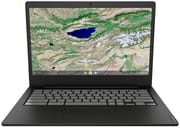 Lenovo Chromebook S340 | Lenovo Chromebook S340 | |
| Price | List Price: $319.99 Amazon Prices: | List Price: $249.99 Amazon Prices: |
| Model number | 81V30000US | 81TB0000US |
| Performance Rating | 3.1 | 3.1 |
| Chromebook Plus | No | No |
| Processor | Dual-core 1.10 Ghz (max 2.60 Ghz) Intel Celeron N4000 Processor | Dual-core 1.10 Ghz (max 2.60 Ghz) Intel Celeron N4000 Processor |
| RAM | 4 GB | 4 GB |
| Internal Storage | 32 GB eMMC | 32 GB eMMC |
| Screen Size | 14" | 14" |
| Screen Resolution | 1920x1080 | 1366x768 |
| Screen Type | IPS | anti-glare |
| Touch Screen | Yes | No |
| Stylus / Pen | No Stylus Support | No Stylus Support |
| Dimensions width x length x thickness | 12.9 x 9.2 x 0.74 inches (327.66 x 233.68 x 18.8 mm) | 12.9 x 9.2 x 0.74 inches (327.66 x 233.68 x 18.8 mm) |
| Weight | 3.02 lbs (1.37 kg) | 3.02 lbs (1.37 kg) |
| Backlit Keyboard | No | No |
| Webcam | 720p | 720p |
| WiFi | Intel 9560 802.11AC (2 x 2) | Intel 9560 802.11AC (2 x 2) |
| Bluetooth | Bluetooth 4.2 | Bluetooth 4.2 |
| Ethernet | No | No |
| Cellular Modem | No | No |
| HDMI | No HDMI | No HDMI |
| USB Ports | 2 USB 3, 2 USB-C (USB-C ports support display output and power input) | 2 USB 3, 2 USB-C (USB-C ports support display output and power input) |
| Thunderbolt Ports | No | No |
| Card Reader | microSD Card Reader | microSD Card Reader |
| Battery | 3 cell, 42 WHr, Lithium-ion | 3 cell, 42 WHr, Lithium-ion |
| Battery Life | 10.0 hours | 10.0 hours |
| Fanless | Yes | Yes |
| Auto Update Expiration Date | June, 2025 | June, 2025 |
Related Chromebooks
-
 Lenovo 14e Chromebook (Gen 3)Lightweight and versatile, the Lenovo 14e Chromebook features a 14-inch FHD IPS touch display,…
 -
 Lenovo IdeaPad Slim 3 ChromebookLenovo IdeaPad Slim 3 Chromebook offers a vibrant 14-inch FHD touchscreen, MediaTek Kompanio 520…
 -
 ASUS Chromebook Flip C434The ASUS Chromebook Flip C434 dazzles with a 14-inch full HD touchscreen and a flexible 360-degree…
 -
 HP Chromebook x360 14b (2024)The HP Chromebook x360 14b series offers versatile 2-in-1 convertible designs with 360-degree…
 -
 ASUS Chromebook CM14 FlipThe ASUS Chromebook CM14 Flip offers a versatile 360-degree convertible design with a 14-inch…
 -
 HP Chromebook 14a (2021)The HP Chromebook 14a combines a 14-inch BrightView touchscreen, HD webcam, and up to 14 hours of…
A Look Back at the Lenovo Chromebook S340
The Lenovo Chromebook S340 embodied the practical, no-frills approach that made budget Chromebooks popular for education and home use during the late 2010s. The silver or platinum gray plastic chassis measured 12.9 x 9.2 x 0.74 inches and weighed just over 3 pounds, making it reasonably portable for students carrying it between classes. Unlike its convertible counterpart, the S340 featured a traditional clamshell design with a 180-degree hinge that allowed the display to fold flat for collaborative viewing, but not beyond for tent or tablet modes.
The 14-inch display featured an anti-glare coating and a touchscreen, both practical additions at this price point. The 1366x768 (HD) resolution was common among budget Chromebooks of the era, though it meant text and images appeared less sharp compared to the Full HD panels found on premium models. NotebookCheck, who reviewed the touchscreen variant (S340-14T), praised the low-reflection coating for its effectiveness at reducing glare from overhead lighting and windows. The touchscreen functionality proved particularly useful for navigating Android apps from the Google Play Store, which became an increasingly important feature as Chrome OS expanded its app ecosystem.
Connectivity options on the Lenovo Chromebook S340 reflected the transition period in laptop design, combining legacy and modern ports. Lenovo equipped the S340 with two USB Type-C ports supporting display output and Power Delivery charging, eliminating the need for a proprietary charger. The two USB 3.0 Type-A ports maintained compatibility with existing peripherals like mice, flash drives, and external keyboards. The microSD card slot provided expandable storage beyond the 32GB internal eMMC, and the Intel Wireless-AC 9560 with Bluetooth 4.2 delivered reliable 2x2 MIMO wireless performance for the era. There was no built-in Ethernet port, though users who needed wired networking could connect a USB Ethernet adapter through one of the USB-A ports.
The Intel Celeron N4000 processor, paired with 4GB of RAM and 32GB of eMMC storage, established clear performance expectations from the start. This dual-core processor handled basic web browsing with multiple tabs, Google Workspace applications, video streaming, and lightweight Android apps without issue. However, more demanding tasks like extensive multitasking with 15+ tabs, video editing, or running resource-intensive Android apps revealed the hardware’s limitations. NotebookCheck’s benchmarking of the S340-14T variant recorded a battery runtime of 8 hours and 32 minutes during their WiFi test, confirming that the Chromebook S340 delivered on its all-day battery promise. The fanless design ensured completely silent operation, making it ideal for quiet study environments, libraries, or shared living spaces.
What Reviewers Said About the Lenovo Chromebook S340
NotebookCheck’s Assessment
NotebookCheck reviewed the Lenovo Chromebook S340-14T and found it to be “an affordable Chromebook without any real quirks.” Their reviewer Sascha Mölck noted that the Celeron N4000 processor from Intel’s Gemini Lake generation provided adequate performance for typical Chromebook workloads, including web browsing, streaming, and productivity applications. The comprehensive benchmark testing included Geekbench and WebXPRT scores that positioned the S340 appropriately among entry-level Chromebooks of its era.
The review highlighted the display’s anti-glare coating as particularly effective, noting that the matte finish reduced distracting reflections better than many competing budget models. However, the HD resolution and modest brightness levels were identified as limitations for users who needed to work outdoors or in brightly lit environments. The battery performance tested at 8 hours and 32 minutes under continuous WiFi load, which validated Lenovo’s claims of all-day battery life for typical usage patterns.
PCWorld’s First Look
PCWorld covered the launch of both the Lenovo C340 and S340 Chromebooks in 2019, positioning the S340 as the more affordable traditional clamshell option for buyers who didn’t need the convertible’s 2-in-1 flexibility. The coverage noted that both models shared the same Intel Celeron N4000 processor and featured similar port selections, with the key difference being the S340’s conventional hinge versus the C340’s 360-degree convertible design. Pricing at launch positioned the S340 as an accessible entry point into Chrome OS for cost-conscious buyers.
Real-World Performance and Use Cases
The Lenovo Chromebook S340 found its niche among specific user groups who valued simplicity over power. Students appreciated the lightweight design and long battery life that could handle a full day of classes without needing to hunt for outlets. The touchscreen added convenience for scrolling through documents, navigating Android apps, and the occasional educational game. Parents bought the S340 as a first computer for children, knowing that Chrome OS’s inherent security and the device’s modest price reduced concerns about both malware and accidental damage.
Home users who primarily consumed content—streaming Netflix, browsing social media, reading news, and managing email—found the S340 delivered everything they needed without the complexity of Windows or macOS. The fanless design meant the device ran silently while streaming video, and the battery could power through multiple movies during travel. Google’s Family Link integration worked well on the S340, allowing parents to manage screen time and content filtering for younger users. Students in school settings may have also encountered the Chromebook magnet trick, where classmates use magnets to trigger lid sensors and put devices to sleep.
The limitations became apparent for users who attempted to push beyond basic tasks. Running multiple heavy web applications simultaneously, such as Google Meet video calls while sharing a Google Slides presentation with several background tabs, could strain the 4GB RAM. The 32GB eMMC storage filled up quickly when installing numerous Android apps, requiring regular management or reliance on cloud storage. The HD resolution, while acceptable for typical use, made detailed spreadsheet work or document editing feel cramped compared to Full HD alternatives.
Historical Perspective
The Lenovo Chromebook S340 represented a particular moment in Chrome OS evolution, when budget Chromebooks successfully competed with entry-level Windows laptops by offering better battery life, faster updates, and simpler operation at comparable or lower prices. The Intel Celeron N4000 processor delivered exactly the performance expected at its price point, and the combination of touchscreen, modern USB-C connectivity, and reliable wireless made the S340 a competent everyday machine during its supported lifetime.
For the target audience of students, casual users, and families seeking an affordable secondary computer, the S340 delivered meaningful value during its years of active Chrome OS support. The fanless design eliminated mechanical failure points, the solid-state storage avoided the slow performance of spinning hard drives still found in some budget Windows laptops of the era, and Chrome OS’s automatic updates meant users always had the latest security patches without any intervention required.
With the Auto Update Expiration date of June 2025 now passed, the Lenovo Chromebook S340 has reached the end of its supported life. While the device continues to function for basic tasks, it no longer receives Chrome OS updates or security patches. For anyone considering a Chromebook today, newer models with later AUE dates and improved processors represent significantly better investments. The Lenovo Chromebook S340 served its purpose well as an accessible entry point to Chrome OS, providing reliable basic computing for thousands of students and families during its active years.
Frequently Asked Questions
Could you run Android apps on the Lenovo Chromebook S340?
Yes, the Lenovo Chromebook S340 supported Google Play Store access, allowing users to install and run Android apps. The touchscreen made interaction with Android apps more intuitive, though the 32GB storage limited how many apps could be installed locally. Basic apps for note-taking, reading, and social media ran fine, while more demanding Android games often struggled with the Celeron N4000 processor.
What was the battery life of the Lenovo Chromebook S340?
Lenovo rated the Chromebook S340 at 10 hours of battery life. NotebookCheck’s testing of the S340-14T variant measured 8 hours and 32 minutes during their WiFi test, which aligned with real-world usage expectations. Students and commuters typically achieved 7-9 hours depending on screen brightness and workload, sufficient for a full school day or workday away from power.
Was the Lenovo Chromebook S340 good for students?
Yes, the Lenovo Chromebook S340 was well-suited for students who needed a reliable device for research, writing papers, and accessing learning management systems. The long battery life meant it lasted through a full school day, and the fanless design allowed quiet use in libraries and study halls. However, students in fields requiring specialized software or heavy computational work needed to consider more powerful alternatives.
Is the Lenovo Chromebook S340 still receiving updates?
No. The Lenovo Chromebook S340 had an Auto Update Expiration (AUE) date of June 2025, which has now passed. The Chromebook no longer receives Chrome OS updates or security patches. The device continues to function, but is no longer suitable for environments requiring up-to-date security.
How was the Lenovo Chromebook S340 different from the C340?
The Lenovo Chromebook S340 featured a traditional clamshell design with a 180-degree hinge, while the C340 was a convertible with a 360-degree hinge that enabled tent, stand, and tablet modes. Both models shared the same Intel Celeron N4000 processor and similar specifications. The S340 was typically less expensive, making it the better choice for users who didn’t need the convertible flexibility.
Could you connect an external monitor to the Lenovo Chromebook S340?
Yes, both USB-C ports on the Lenovo Chromebook S340 supported DisplayPort output, allowing connection to external monitors using a USB-C to HDMI or USB-C to DisplayPort adapter. This made it possible to extend the display for additional workspace or mirror the screen for presentations. The Intel UHD Graphics 600 could drive external displays at reasonable resolutions for productivity work.
Did the Lenovo Chromebook S340 have a touchscreen?
Yes, the Lenovo Chromebook S340 included a touchscreen display despite being a traditional clamshell rather than a convertible. The touchscreen functionality proved useful for navigating Chrome OS, interacting with Android apps, and scrolling through content without using the trackpad. Combined with the anti-glare coating, the display provided a pleasant user experience for everyday tasks.
Was the Lenovo Chromebook S340 silent during operation?
Yes, the Lenovo Chromebook S340 featured a fanless design with passive cooling, which meant it operated completely silently under all conditions. This made it ideal for quiet environments like libraries, classrooms, or bedrooms where fan noise would have been distracting. The trade-off was that under sustained heavy loads, performance throttling could occur to manage thermals.