
Samsung Chromebook 4
Updated on

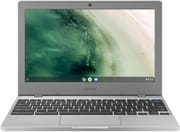
The Samsung Chromebook 4 is a compact, low cost 11.6 inch Chromebook that Samsung shipped from 2019 onward in two waves of RAM and storage configurations: the original K01US through K04US SKUs with an Intel Celeron N4000, and a 2021 refresh on KA1US, KB1US, KC1US, and KD1US that moved to the slightly newer Intel Celeron N4020 (each model number appears in its Amazon listing title). The base model launched at $229.99 with the N4000, 4GB of RAM, and 32GB of eMMC. The plastic shell feels solid for the price, but there is no backlit keyboard, no fingerprint reader, and no touchscreen on any version. ChromeOS support runs through June 2029 (Google’s published Auto Update Expiration date for the device, after an extension from its original 2027 date).
A hardy plastic shell around a dim TN panel
| Pros | Cons |
|---|---|
| Compact and portable | Poor screen quality |
| Decent battery life | Substandard sound |
| Hardy plastic construction | 720p webcam captures dim images |
| Affordable | Performance is only adequate |
Related Videos
Samsung Chromebook 4 Comparison Chart
 Samsung Chromebook 4 | Samsung Chromebook 4 | Samsung Chromebook 4 | Samsung Chromebook 4 | Samsung Chromebook 4 | Samsung Chromebook 4 | Samsung Chromebook 4 | Samsung Chromebook 4 | |
| Price | List Price: $229.99 Amazon Prices: Loading prices... | List Price: $229.99 Amazon Prices: Loading prices... | List Price: $224.99 Amazon Prices: Loading prices... | List Price: $239.99 Amazon Prices: Loading prices... | List Price: $239.99 Amazon Prices: Loading prices... | List Price: $249.99 Amazon Prices: Loading prices... | List Price: $279.99 Amazon Prices: Loading prices... | List Price: $224.99 Amazon Prices: |
| Model number | XE310XBA-KC1US | XE310XBA-K01US | XE310XBA-KD1US | XE310XBA-KA1US | XE310XBA-KB1US | XE310XBA-K02US | XE310XBA-K03US | XE310XBA-K04US |
| Performance Rating | 3.1 | 3.1 | 3.1 | 3.1 | 3.1 | 3.1 | 3.5 | 3.1 |
| Chromebook Plus | No | No | No | No | No | No | No | No |
| Processor | Dual-core 1.10 Ghz (max 2.80 Ghz) Intel Celeron Processor N4020 | Dual-core 1.10 Ghz (max 2.60 Ghz) Intel Celeron N4000 Processor | Dual-core 1.10 Ghz (max 2.80 Ghz) Intel Celeron Processor N4020 | Dual-core 1.10 Ghz (max 2.80 Ghz) Intel Celeron Processor N4020 | Dual-core 1.10 Ghz (max 2.80 Ghz) Intel Celeron Processor N4020 | Dual-core 1.10 Ghz (max 2.60 Ghz) Intel Celeron N4000 Processor | Dual-core 1.10 Ghz (max 2.60 Ghz) Intel Celeron N4000 Processor | Dual-core 1.10 Ghz (max 2.60 Ghz) Intel Celeron N4000 Processor |
| RAM | 4 GB | 4 GB | 4 GB | 4 GB | 4 GB | 4 GB | 6 GB | 4 GB |
| Internal Storage | 32 GB eMMC | 32 GB eMMC | 16 GB eMMC | 32 GB eMMC | 16 GB eMMC | 64 GB eMMC | 64 GB eMMC | 16 GB eMMC |
| Screen Size | 11.6" | 11.6" | 11.6" | 11.6" | 11.6" | 11.6" | 11.6" | 11.6" |
| Screen Resolution | 1366x768 | 1366x768 | 1366x768 | 1366x768 | 1366x768 | 1366x768 | 1366x768 | 1366x768 |
| Screen Type | HD LED | HD LED | HD LED | HD LED | HD LED | HD LED | HD LED | HD LED |
| Touch Screen | No | No | No | No | No | No | No | No |
| Stylus / Pen | No Stylus Support | No Stylus Support | No Stylus Support | No Stylus Support | No Stylus Support | No Stylus Support | No Stylus Support | No Stylus Support |
| Dimensions width x length x thickness | 11.33 x 7.96 x 0.66 inches (287.78 x 202.18 x 16.76 mm) | 11.33 x 7.96 x 0.66 inches (287.78 x 202.18 x 16.76 mm) | 11.33 x 7.96 x 0.66 inches (287.78 x 202.18 x 16.76 mm) | 11.33 x 7.96 x 0.66 inches (287.78 x 202.18 x 16.76 mm) | 11.33 x 7.96 x 0.66 inches (287.78 x 202.18 x 16.76 mm) | 11.33 x 7.96 x 0.66 inches (287.78 x 202.18 x 16.76 mm) | 11.33 x 7.96 x 0.66 inches (287.78 x 202.18 x 16.76 mm) | 11.33 x 7.96 x 0.66 inches (287.78 x 202.18 x 16.76 mm) |
| Weight | 2.6 lbs (1.18 kg) | 2.6 lbs (1.18 kg) | 2.6 lbs (1.18 kg) | 2.6 lbs (1.18 kg) | 2.6 lbs (1.18 kg) | 2.6 lbs (1.18 kg) | 2.6 lbs (1.18 kg) | 2.6 lbs (1.18 kg) |
| Backlit Keyboard | No | No | No | No | No | No | No | No |
| Webcam | 720p | 720p | 720p | 720p | 720p | 720p | 720p | 720p |
| WiFi | 802.11 ac wave2 | 802.11 ac wave2 | 802.11 ac wave2 | 802.11 ac wave2 | 802.11 ac wave2 | 802.11 ac wave2 | 802.11 ac wave2 | 802.11 ac wave2 |
| Bluetooth | Bluetooth 4.0 | Bluetooth 4.0 | Bluetooth 4.0 | Bluetooth 4.0 | Bluetooth 4.0 | Bluetooth 4.0 | Bluetooth 4.0 | Bluetooth 4.0 |
| Ethernet | No | No | No | No | No | No | No | No |
| Cellular Modem | No | No | No | No | No | No | No | No |
| HDMI | No HDMI | No HDMI | No HDMI | No HDMI | No HDMI | No HDMI | No HDMI | No HDMI |
| USB Ports | 1 USB 3, 1 USB-C (Type C ports support display output and power delivery) | 1 USB 3, 1 USB-C (Type C ports support display output and power delivery) | 1 USB 3, 1 USB-C (Type C ports support display output and power delivery) | 1 USB 3, 1 USB-C (Type C ports support display output and power delivery) | 1 USB 3, 1 USB-C (Type C ports support display output and power delivery) | 1 USB 3, 1 USB-C (Type C ports support display output and power delivery) | 1 USB 3, 1 USB-C (Type C ports support display output and power delivery) | 1 USB 3, 1 USB-C (Type C ports support display output and power delivery) |
| Thunderbolt Ports | No | No | No | No | No | No | No | No |
| Card Reader | No Card Reader | microSD Card Reader | No Card Reader | No Card Reader | No Card Reader | microSD Card Reader | microSD Card Reader | microSD Card Reader |
| Battery | 2 cell, 5070mAh, Li-Ion | 2 cell, 5070mAh, Li-Ion | 2 cell, 5070mAh, Li-Ion | 2 cell, 5070mAh, Li-Ion | 2 cell, 5070mAh, Li-Ion | 2 cell, 5070mAh, Li-Ion | 2 cell, 5070mAh, Li-Ion | 2 cell, 5070mAh, Li-Ion |
| Battery Life | 12.5 hours | 12.5 hours | 12.5 hours | 12.5 hours | 12.5 hours | 12.5 hours | 12.5 hours | 12.5 hours |
| Fanless | Yes | Yes | Yes | Yes | Yes | Yes | Yes | Yes |
| Auto Update Expiration Date | June, 2029 | June, 2029 | June, 2029 | June, 2029 | June, 2029 | June, 2029 | June, 2029 | June, 2029 |
Related Chromebooks
-
 Dell Chromebook 11 (3100)The Dell Chromebook 11 (3100) is a ruggedized 11.6-inch education Chromebook with rubber bumpers, a…
 -
 ASUS Chromebook CX1 (CX1101)The ASUS Chromebook CX1 (CX1101) is an 11.6-inch budget Chromebook with an Intel Celeron N4020, an…
 -
 Samsung Galaxy Chromebook Go 14"The Samsung Galaxy Chromebook Go 14 is a budget 14-inch Chromebook with an Intel Celeron N4500, a…
 -
 Acer Chromebook 311 C723The Acer Chromebook 311 C723 is an 11.6-inch education Chromebook built to MIL-STD-810H durability,…
 -
 Acer Chromebook 311 (CO731)The Acer Chromebook 311 (CO731) is a fanless 11.6-inch Chromebook with an Intel Celeron N4500, 4GB…
 -
 ASUS Chromebook CR11 (CR1104C)The ASUS Chromebook CR11 (CR1104C) is a ruggedized 11.6-inch Chromebook built for students and…
The 11.6 inch, 1366x768 TN panel on every variant limits viewing angles and color accuracy and looks dim in a sunlit room. The smaller screen size masks some of that pain (text feels sharper at this resolution than it would at 15 inches), but anyone coming from an IPS panel will notice. Speakers are bottom firing and quiet, and the 720p webcam captures dull, low light images. Performance from the Celeron N4000 (or the N4020 in the 2021 refresh) is enough for Google Docs, Gmail, a handful of tabs, and casual YouTube. It is not enough for heavy multitasking; ChromeOS will start to stutter once you stack ten or more tabs against just 4GB of RAM.
The port loadout is minimal but usable: one USB-C port (which doubles as the charging port), one USB 3.0 Type-A port that pairs well with a USB ethernet adapter, a combo audio jack, a Kensington lock slot, and, on the original K01US through K04US SKUs, a microSD card reader. The four 2021 refresh SKUs (KA1US, KB1US, KC1US, KD1US) drop the slot; KC1US and KD1US are sold as “2021 Model Without SD Slot” on Amazon, so check the model number if expandable storage matters. Wi-Fi is 802.11ac (Wi-Fi 5), Bluetooth is 4.0, and Samsung rates battery life at up to 12.5 hours of light browsing.
Reviewer Insights
PCMag: an average score for a murky panel
Eric Grevstad at PCMag reviewed the XE310XBA-K02US configuration (4GB RAM, 64GB storage) at $242.51 as tested, and gave it a 3.0 “Average” score. He framed the 11.6 inch design as the more successful of the two siblings, calling it “a bit more successful than its bigger sibling” the Chromebook 4+, partly because “its low screen quality is less noticeable at the smaller size.”
Grevstad wrote that the “antique twisted-nematic (TN), rather than in-plane-switching (IPS), panel technology translates to narrow viewing angles and dishwater-murky colors,” and noted that the low brightness makes images “pale and dingy at the same time, with weak contrast.” On audio he wrote: “Sound from the bottom-mounted speakers seems muted or muffled even with volume cranked to the max.” PCMag also observed that the 720p webcam “captures dim, barely tinted (instead of colorful) images” during testing.
PCMag found the plastic chassis “fairly hardy, without too much flex when you grasp the screen corners or press the keyboard deck,” and praised the typing experience as having “adequate travel and tactile feedback.” His closing verdict: “The Samsung Chromebook 4 gets the job done, but in the manner of a space-saver spare tire instead of a high-performance radial. If you can afford a higher-priced and better-equipped laptop, you’ll have a much more enjoyable ride.”
Tech Synth: capable for the price until the tabs stack up
In his YouTube review, Tech Synth walks through the entry level 4GB / 32GB N4000 configuration and frames it as a sub-budget purchase decision. He says the Intel Celeron N4000 is “pretty much as entry level as it gets” and that for ordinary web and document work, “basic day-to-day tasks is about all you’ll be able to do” on this Chromebook. He still grades that performance as “surprisingly capable” for the price.
Tech Synth says he wouldn’t normally recommend a laptop with only 4GB of RAM because “it just really isn’t enough,” but adds that “these are acceptable circumstances” on a low end Chromebook where most owners “probably won’t have a bunch of tabs open at the same time.” Push past that limit and, in his words, the system “will start to lag and freeze.”
Best suited to light web work on a small budget
Students and tight-budget buyers get a small, light Chromebook that handles the web, Google Docs, Gmail, and a single Zoom call at a time. The best Chromebooks under $300 guide collects similar options if this specific model is sold out or you want a touchscreen.
If you want a brighter or higher resolution screen, better speakers, more than 4GB of RAM, a backlit keyboard, or a touchscreen, look elsewhere. The Chromebook 4 will feel cramped fast under any workload heavier than a few tabs and a Google Doc, and the TN panel will not get more flattering with age. The eight SKUs list between $224.99 and $279.99, and every one of them ships 4GB of RAM except the 6GB XE310XBA-K03US.
If you are weighing it against other budget options, the Chromebook Comparison Chart lets you sort and filter the full catalog by price, screen size, and specs side by side.
Frequently Asked Questions
Q: How long does the battery last on the Samsung Chromebook 4?
A: Samsung rates it at up to 12.5 hours of light browsing on a single charge, which covers a school or work day.
Q: What kind of processor does the Samsung Chromebook 4 have?
A: Either an Intel Celeron N4000 on the 2019 SKUs or an Intel Celeron N4020 on the 2021 refresh. Both cover web browsing, email, and document editing. Anything heavier than a handful of tabs is past their limit.
Q: Can I upgrade the storage on the Samsung Chromebook 4?
A: No. The eMMC storage is 16GB, 32GB, or 64GB depending on the model and cannot be replaced. The original K01US through K04US SKUs take a microSD card for extra space; the 2021 KA1US, KB1US, KC1US, and KD1US SKUs ship without the slot.
Q: Does the Samsung Chromebook 4 have a backlit keyboard?
A: No version has a backlit keyboard, so typing in a dark room is harder than it needs to be.
Q: Can the Samsung Chromebook 4 handle multiple tasks at once?
A: A handful of browser tabs alongside Google Docs is fine. The 4GB RAM ceiling is the real limit; once you stack ten or more tabs, especially with a video call running, ChromeOS slows down and reloads tabs as memory pressure builds. The 6GB / 64GB XE310XBA-K03US variant has more headroom for that kind of workload.
Q: When does the Samsung Chromebook 4 stop getting ChromeOS updates?
A: June 2029, per Google’s published Auto Update Expiration date (extended from the original 2027 date). After that the device stops receiving new ChromeOS versions and security updates, and any browser based service that requires a current Chrome version will eventually break. Buying new in 2026 leaves roughly three years of update support.
Q: Does the Samsung Chromebook 4 have a touchscreen?
A: No version has one. The screen is an 11.6-inch HD LED panel running 1366x768.
Q: Is the Samsung Chromebook 4 good for students?
A: For students on a tight budget, yes. At 2.6 pounds it is easy to carry to and from school, the battery is rated for a full day, and the plastic shell is hardy for the money. The screen and the 4GB RAM ceiling are what you give up.