
Samsung Chromebook 4+
Updated on

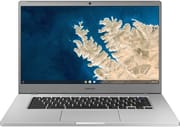
The Samsung Chromebook 4+ runs an Intel Celeron N4000 or N4020 behind a 15.6-inch Full HD display, with 4-6GB of RAM and 32-128GB of storage depending on the configuration. It aims at students and home users who spend the day in a browser and in email, and Chrome OS handles updates and security on its own. The panel and the chassis are where the low price shows.
| Pros | Cons |
|---|---|
| Large 15.6” FHD display | TN panel has poor viewing angles and washed-out colors |
| Aluminum lid gives the machine a MacBook-like look at a budget price | Significant chassis flex, especially when adjusting screen angle |
| Celeron N4000 keeps everyday tasks moving smoothly | No keyboard backlighting limits use in dim environments |
| Dual USB-C ports on both sides offer convenient charging flexibility | Outdated Wi-Fi 5 (802.11ac) and Bluetooth 4.0 connectivity |
| Speakers put out full, round sound uncommon at this price | 720p webcam produces blurry, washed-out video |
| Fanless design runs silently | Battery life falls short of Samsung’s 10.5-hour rating (8-9 hours real-world) |
Related Videos
Samsung Chromebook 4+ Comparison Chart
 Samsung Chromebook 4+ | Samsung Chromebook 4+ | Samsung Chromebook 4+ | Samsung Chromebook 4+ | Samsung Chromebook 4+ | |
| Price | List Price: $319.99 Amazon Prices: Loading prices... | List Price: $299.99 Amazon Prices: Loading prices... | List Price: $349.99 Amazon Prices: Loading prices... | List Price: $299.99 Amazon Prices: Loading prices... | List Price: $239.00 Amazon Prices: Loading prices... |
| Model number | XE350XBA-K02US | XE350XBA-K01US | XE350XBA-K03US | XE350XBA-KA1US | XE350XBA-K05US |
| Performance Rating | 3.1 | 3.1 | 3.5 | 3.1 | 3.1 |
| Chromebook Plus | No | No | No | No | No |
| Processor | Dual-core 1.10 Ghz (max 2.60 Ghz) Intel Celeron N4000 Processor | Dual-core 1.10 Ghz (max 2.60 Ghz) Intel Celeron N4000 Processor | Dual-core 1.10 Ghz (max 2.60 Ghz) Intel Celeron N4000 Processor | Dual-core 1.10 Ghz (max 2.60 Ghz) Intel Celeron N4000 Processor | Dual-core 1.10 Ghz (max 2.60 Ghz) Intel Celeron N4000 Processor |
| RAM | 4 GB | 4 GB | 6 GB | 4 GB | 4 GB |
| Internal Storage | 64 GB eMMC | 32 GB eMMC | 64 GB eMMC | 32 GB eMMC | 128 GB eMMC |
| Screen Size | 15.6" | 15.6" | 15.6" | 15.6" | 15.6" |
| Screen Resolution | 1920x1080 | 1920x1080 | 1920x1080 | 1920x1080 | 1920x1080 |
| Screen Type | FHD LED | FHD LED | FHD LED | FHD LED | FHD LED |
| Touch Screen | No | No | No | No | No |
| Stylus / Pen | No Stylus Support | No Stylus Support | No Stylus Support | No Stylus Support | No Stylus Support |
| Dimensions width x length x thickness | 14.16 x 9.64 x 0.65 inches (359.66 x 244.86 x 16.51 mm) | 14.16 x 9.64 x 0.65 inches (359.66 x 244.86 x 16.51 mm) | 14.16 x 9.64 x 0.65 inches (359.66 x 244.86 x 16.51 mm) | 14.16 x 9.64 x 0.65 inches (359.66 x 244.86 x 16.51 mm) | 14.16 x 9.64 x 0.65 inches (359.66 x 244.86 x 16.51 mm) |
| Weight | 3.75 lbs (1.7 kg) | 3.75 lbs (1.7 kg) | 3.75 lbs (1.7 kg) | 3.75 lbs (1.7 kg) | 3.75 lbs (1.7 kg) |
| Backlit Keyboard | No | No | No | No | No |
| Webcam | 720p | 720p | 720p | 720p | 720p |
| WiFi | 802.11 ac wave2 | 802.11 ac wave2 | 802.11 ac wave2 | 802.11 ac wave2 | 802.11 ac wave2 |
| Bluetooth | Bluetooth 4.0 | Bluetooth 4.0 | Bluetooth 4.0 | Bluetooth 4.0 | Bluetooth 4.0 |
| Ethernet | No | No | No | No | No |
| Cellular Modem | No | No | No | No | No |
| HDMI | No HDMI | No HDMI | No HDMI | No HDMI | No HDMI |
| USB Ports | 1 USB 3, 2 USB-C (Type C ports support display output and power delivery) | 1 USB 3, 2 USB-C (Type C ports support display output and power delivery) | 1 USB 3, 2 USB-C (Type C ports support display output and power delivery) | 1 USB 3, 2 USB-C (Type C ports support display output and power delivery) | 1 USB 3, 2 USB-C (Type C ports support display output and power delivery) |
| Thunderbolt Ports | No | No | No | No | No |
| Card Reader | microSD Card Reader | microSD Card Reader | microSD Card Reader | microSD Card Reader | microSD Card Reader |
| Battery | 2 cell, 5070mAh, Li-Ion | 2 cell, 5070mAh, Li-Ion | 2 cell, 5070mAh, Li-Ion | 2 cell, 5070mAh, Li-Ion | 2 cell, 5070mAh, Li-Ion |
| Battery Life | 10.5 hours | 10.5 hours | 10.5 hours | 10.5 hours | 10.5 hours |
| Fanless | Yes | Yes | Yes | Yes | Yes |
| Auto Update Expiration Date | June, 2029 | June, 2029 | June, 2029 | June, 2029 | June, 2029 |
Related Chromebooks
-
 Acer Chromebook 715The Acer Chromebook 715 is a fanless 15.6-inch full-HD IPS Chromebook with an aluminum chassis, a…
 -
 HP Chromebook 15 (15a-na2)The HP Chromebook 15 (15a-na2) is a fanless 15.6-inch Chromebook with an Intel N200, 8GB of DDR5, a…
 -
 ASUS Chromebook CX1 (CX1500)The ASUS Chromebook CX1 (CX1500) is a 15.6-inch full HD Chromebook with a number pad, an Intel…
 -
 Lenovo 3i ChromebookThe Lenovo 3i Chromebook offers a large 15.6-inch anti-glare FHD display with a numeric keypad,…
 -
 Lenovo IdeaPad 3i ChromebookThe Lenovo IdeaPad 3i Chromebook is a 15.6-inch Full HD Chromebook with an Intel Celeron N4500 and…
 -
 Acer Chromebook 15 315The Acer Chromebook 15 315 combines a comfortable 15.6'' ComfyView display and fanless design for…
Budget compromises around a big, sharp panel

The aluminum lid gives the Chromebook 4+ a MacBook-like look, and the rest of the chassis is plastic that flexes under normal handling. The keyboard deck can feel unstable while you type or move the screen.
The 1920x1080 resolution keeps text sharp for web browsing, document editing, and video streaming, and the 15.6-inch size makes multitasking more comfortable. Samsung chose a TN panel rather than an IPS one, so colors shift and wash out from off-center positions. Android Authority noted that “on lower brightness settings, visibility of around half the screen is affected” due to these viewing angle limitations.
The Intel Celeron N4000 (or N4020 in 2021 models) carries typical web browsing with 10-12 tabs without issue, though pushing beyond that with multiple video streams can cause stuttering and frame drops. Chrome Unboxed noted that “from a performance/productivity standpoint, you’d never know the Samsung Chromebook 4+ was less than half the price” of premium Chromebooks. Google Docs, Sheets, and email run without complaint, and the machine can drive an external 1440p ultrawide monitor without significant performance degradation.
Connectivity options include dual USB-C ports (one on each side), a single USB-A 3.0 port, a microSD card slot for storage expansion, and a headphone/microphone combo jack. The USB-C ports support both charging and display output, offering flexibility for connecting to external monitors or peripherals. There is no HDMI port for direct monitor connections, so most displays need a USB-C adapter, and there is no built-in Ethernet port, though you can add wired networking with a USB Ethernet adapter if you need a more stable connection. The wireless side is Wi-Fi 5 (802.11ac Wave2) and Bluetooth 4.0, both older than the Wi-Fi 6 and Bluetooth 5.x standards.
The keys have a textured finish and an angled depression that keeps extended typing sessions manageable, and the trackpad is generously sized and responsive. The lack of keyboard backlighting is a notable omission that makes the device frustrating to use in dimly lit rooms, and the chassis flex reaches the trackpad, creating an occasionally mushy sensation when clicking.
Samsung rates the Chromebook 4+ at 10.5 hours, but real-world testing typically yields closer to 8-9 hours of actual use depending on screen brightness and workload. USB-C charging means any modern charger or portable battery can top up the device.
Chrome Unboxed described the built-in speakers as producing some of the roundest, fullest sound they had heard from a Chromebook in this price range. They could stand to be louder for some use cases, but the sound holds up for casual media without headphones or external speakers. If you’re curious about using a Chromebook for audio work, our guide to music production on Chromebook covers the DAWs that actually work.
Reviewer Insights

Chrome Unboxed’s Perspective
Robby Payne of Chrome Unboxed compared Samsung’s approach to Apple’s iPhone SE strategy of prioritizing core performance over premium materials. He said the Intel Celeron N4000 is “not the worst part of the package” for the first time in his experience with budget Chromebooks. He called the speakers “among the roundest, fullest speakers I’ve heard on a Chromebook” despite the overall budget positioning.
Payne characterized the construction as having “a flimsy plastic build with significant flex” and noted that the TN display produces “muted colors” with “atrocious viewing angles.” He called the device “good enough for the price” at its roughly $300 price.
Android Authority’s Perspective
Palash Volvoikar of Android Authority rated the Samsung Chromebook 4+ 7 out of 10, appreciating its role as a functional budget option. He called the keyboard a standout feature, noting that “the keys have a textured finish and have an angled depression that makes them comfortable to type on.” The metal lid impressed him with its premium feel, and he found the port selection adequate for most users’ needs.
The display viewing angles were “so bad that on lower brightness settings, visibility of around half the screen is affected.” Battery life came in at 8-9 hours, below the 12 hours he treats as typical for a Chromebook, and he criticized the 720p webcam for producing “blurry images and washed-out colors.” He concluded, “You get what you pay for, but it may be enough depending upon what you need.”
Customer Reviews
Across 620 ratings on Amazon, the Samsung Chromebook 4+ averages 4.4 stars, with 74 percent of buyers leaving five stars and 6 percent leaving one. The recurring praise is about reliability and basic-use value. Edward H. Goodan, a verified buyer, wrote “I’m still using this years after purchase. Very reliable for internet searching or checking email.” A verified buyer named jd sweeney liked the hardware, writing “The exterior is solid and built to last. The keyboard feels great,” though he flagged weak speakers: “The sound is fine if you are right next to the computer but if you want to listen to something a few feet away then it is hard to hear at the highest setting.”
The complaints cluster around the display and one warranty problem. A verified buyer named Sunnyman gave it four stars and called out the screen, noting “the color was so dull even at the maximum brightness.” The lone one-star review here comes from verified buyer R. Atkinson, whose unit died within months and who disputed the stated warranty length; he concluded “There are many better Chromebook vendors. I would NOT buy this Samsung product again.” Read more owner reviews on Amazon.
A quiet, large-screen machine for browser work
Chrome OS support runs until June 2029, so buyers can expect nearly three more years of automatic updates and security patches. Screen size at a low price is what this Samsung sells on, and Payne and Volvoikar both judged it usable on those terms.
To see how the Chromebook 4+ stacks up against other models side by side, visit the Chromebook Comparison Chart to sort and filter by the specs that matter most to you.
Frequently Asked Questions
When does the Samsung Chromebook 4+ stop receiving updates?
The XE350XBA series has an Auto Update Expiration (AUE) date of June 2029. Google provides Chrome OS updates, security patches, and new features until that date.
Can I upgrade the RAM or storage on the Samsung Chromebook 4+?
No. The RAM and internal storage are soldered to the motherboard. You can expand storage using the built-in microSD card slot, which supports high-capacity cards for additional file storage.
Is the Samsung Chromebook 4+ good for students?
Students who work in web applications like Google Docs, Classroom, and educational websites are the fit. The large 15.6-inch display makes it comfortable for extended study sessions, and the fanless design allows quiet operation in libraries or classrooms. Its Chrome OS security and automatic updates keep everyday student use secure.
How does the display quality compare to other Chromebooks?
The TN (Twisted Nematic) panel gives noticeably poorer viewing angles and less vibrant colors than an IPS display. Payne and Volvoikar both criticized the display. If display quality is a priority, consider alternatives with IPS screens like the Acer Chromebook Spin 713 or Lenovo Chromebook Flex 5.
Can I connect an external monitor to the Samsung Chromebook 4+?
Both USB-C ports support display output, so you can connect to USB-C monitors directly or use a USB-C to HDMI adapter for traditional monitors. Chrome Unboxed tested it successfully with a 1440p ultrawide monitor without noticeable performance degradation. There is no built-in HDMI port, so an adapter is required for most external displays.
What is the battery life of the Samsung Chromebook 4+?
Samsung rates the battery life at 10.5 hours, but real-world testing by reviewers typically shows 8-9 hours of actual use. This is slightly below the 10-12 hour standard for many Chromebooks, though still sufficient for a full school or work day without charging.
What are the main differences between the Chromebook 4+ variants?
The configurations differ in RAM (4GB or 6GB) and storage (32GB, 64GB, or 128GB). The 2021 model uses the slightly updated Intel Celeron N4020 processor instead of the N4000 found in earlier versions. All variants share the same 15.6-inch FHD display, aluminum lid design, and port selection. The 6GB/64GB configuration offers the best balance of memory and storage for users who multitask frequently, while the 128GB SSD variant provides the most storage space for offline files and Android apps.