
GMKtec M7 Ultra

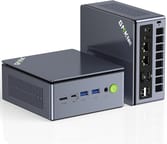
The GMKtec M7 Ultra represents a compelling entry in the compact desktop replacement market, packing serious performance into a palm-sized package measuring just 5.2 x 4.9 x 2.3 inches. Powered by the AMD Ryzen 7 PRO 6850U processor with its integrated Radeon 680M graphics, this mini PC targets users who need more than basic computing but want to keep their desk space free of bulky towers. What truly sets the M7 Ultra apart from the crowded mini PC field is its inclusion of an OCuLink port, a rare feature that allows connecting an external graphics card at near-native PCIe 4.0 x4 speeds, making it a future-proof choice for those who might want to add serious graphics horsepower down the road.
Pros and Cons of the GMKtec M7 Ultra
| Pros | Cons |
|---|---|
| OCuLink port enables external GPU at PCIe 4.0 x4 speeds | Requires FSR or frame generation for 60 FPS in demanding games |
| Dual USB4 40Gbps ports with Power Delivery | PCIe 3.0 storage instead of faster PCIe 4.0 |
| Dual 2.5G Intel I226V Ethernet ports | WiFi signal strength may be weaker than competitors |
| Compact palm-sized design (132x125x58mm) | Plastic chassis despite solid build quality |
| Configurable TDP from 35W to 65W in BIOS | Integrated graphics hit limits on Very High settings |
| VESA mount and HDMI cable included in box | No Thunderbolt support despite USB4 ports |
Related Videos
GMKtec M7 Ultra Comparison Chart
 GMKtec M7 Ultra | GMKtec M7 Ultra | GMKtec M7 Ultra | GMKtec M7 Ultra | |
| Price | List Price: $549.99 Amazon Prices: Loading prices... | List Price: $419.99 Amazon Prices: Loading prices... | List Price: $439.99 Amazon Prices: Loading prices... | List Price: $499.99 Amazon Prices: Loading prices... |
| Version | --- | --- | --- | --- |
| Perfomance Rating | 7.3 | 7.3 | 8.0 | 8.0 |
| Operating System | Windows 11 Pro | Windows 11 Pro | Windows 11 Pro | Windows 11 Pro |
| Processor | Octa-core 2.70 Ghz (max 4.70 Ghz) AMD Ryzen 7 PRO 6850U | Octa-core 2.70 Ghz (max 4.70 Ghz) AMD Ryzen 7 PRO 6850U | Octa-core 2.70 Ghz (max 4.70 Ghz) AMD Ryzen 7 PRO 6850U | Octa-core 2.70 Ghz (max 4.70 Ghz) AMD Ryzen 7 PRO 6850U |
| GPU | Integrated Intel UHD Graphics | Integrated Intel UHD Graphics | Integrated Intel UHD Graphics | Integrated Intel UHD Graphics |
| RAM | 16 GB DDR5 SO-DIMM, 2-channel | 16 GB DDR5 SO-DIMM, 2-channel | 32 GB DDR5 SO-DIMM, 2-channel | 32 GB DDR5 SO-DIMM, 2-channel |
| Internal Storage | 512 GB | 1 TB | 512 GB | 1 TB |
| Dimensions width x length x thickness | 5.2 x 4.92 x 2.28 inches (132.08 x 124.97 x 57.91 mm) | 5.2 x 4.92 x 2.28 inches (132.08 x 124.97 x 57.91 mm) | 5.2 x 4.92 x 2.28 inches (132.08 x 124.97 x 57.91 mm) | 5.2 x 4.92 x 2.28 inches (132.08 x 124.97 x 57.91 mm) |
| Weight | 1.33 lbs (0.6 kg) | 1.33 lbs (0.6 kg) | 1.33 lbs (0.6 kg) | 1.33 lbs (0.6 kg) |
| WiFi | Wi-Fi 6E (802.11ax) | Wi-Fi 6E (802.11ax) | Wi-Fi 6E (802.11ax) | Wi-Fi 6E (802.11ax) |
| Bluetooth | Bluetooth 5.2 | Bluetooth 5.2 | Bluetooth 5.2 | Bluetooth 5.2 |
| Ethernet | 2 Ethernet ports at 2.5 Gbps | 2 Ethernet ports at 2.5 Gbps | 2 Ethernet ports at 2.5 Gbps | 2 Ethernet ports at 2.5 Gbps |
| HDMI | 1 2.1 Port | 1 2.1 Port | 1 2.1 Port | 1 2.1 Port |
| DisplayPort | 1 DisplayPort (DisplayPort 2.0) | 1 DisplayPort (DisplayPort 2.0) | 1 DisplayPort (DisplayPort 2.0) | 1 DisplayPort (DisplayPort 2.0) |
| VGA | No VGA Ports | No VGA Ports | No VGA Ports | No VGA Ports |
| USB Ports | 2 USB 2.0, 2 USB 3, 2 USB 4 | 2 USB 2.0, 2 USB 3, 2 USB 4 | 2 USB 2.0, 2 USB 3, 2 USB 4 | 2 USB 2.0, 2 USB 3, 2 USB 4 |
| Thunderbolt Ports | No | No | No | No |
| Internal SATA Ports | No SATA ports | No SATA ports | No SATA ports | No SATA ports |
| Card Reader | No Card Reader | No Card Reader | No Card Reader | No Card Reader |
| Headphone Jack | 3.5mm combo | 3.5mm combo | 3.5mm combo | 3.5mm combo |
| Fanless | No | No | No | No |
| VESA Mount | Yes | Yes | Yes | Yes |
| In the Box | Power adapter, VESA mount with screws, HDMI cable, user manual | Power adapter, VESA mount with screws, HDMI cable, user manual | Power adapter, VESA mount with screws, HDMI cable, user manual | Power adapter, VESA mount with screws, HDMI cable, user manual |
| Expandability | 2x SO-DIMM DDR5 slots (max 64GB), 2x M.2 2280 PCIe 3.0 slots (up to 8TB each), OCuLink port for eGPU | 2x SO-DIMM DDR5 slots (max 64GB), 2x M.2 2280 PCIe 3.0 slots (up to 8TB each), OCuLink port for eGPU | 2x SO-DIMM DDR5 slots (max 64GB), 2x M.2 2280 PCIe 3.0 slots (up to 8TB each), OCuLink port for eGPU | 2x SO-DIMM DDR5 slots (max 64GB), 2x M.2 2280 PCIe 3.0 slots (up to 8TB each), OCuLink port for eGPU |
Detailed Insights into the GMKtec M7 Ultra

The M7 Ultra makes a strong first impression with its dense, solid construction despite the plastic chassis. At just 1.33 pounds and small enough to hold in one hand, it feels surprisingly substantial for its size. The dual-fan Hyper Ice chamber cooling system keeps the internals running cool during demanding tasks, with GMKtec claiming noise levels stay under 38dB during normal operation. The clean, modern aesthetic works equally well tucked behind a monitor on the included VESA mount or sitting on a desk as a conversation piece about what modern compact computing can achieve.
Under the hood, the AMD Ryzen 7 PRO 6850U brings eight cores and sixteen threads with boost clocks up to 4.7GHz, paired with the capable Radeon 680M integrated graphics featuring 12 RDNA2 compute units. This combination handles office productivity, content creation, and even light gaming at 1080p with medium settings without breaking a sweat. The Radeon 680M can run many AAA titles from the past few years at 720p to 1080p with low to medium settings, though modern releases will benefit from AMD’s FSR upscaling technology. For users needing more graphics power, that OCuLink port opens the door to connecting an external GPU enclosure, transforming the M7 Ultra into a legitimate gaming or content creation workstation.
Connectivity is where the M7 Ultra truly shines among its peers in this price range. The front panel offers two USB-A 3.2 Gen 2 ports, one USB4 Type-C port, and the headline-grabbing OCuLink connection, while the rear provides another USB4 port, two USB 2.0 ports, HDMI 2.1, DisplayPort 2.0, dual 2.5G Ethernet ports with Intel I226V controllers, and a 3.5mm audio combo jack. WiFi 6E and Bluetooth 5.2 round out the wireless options. The dual 2.5G Ethernet ports make this an intriguing option for home lab enthusiasts or anyone running network-intensive applications, while the dual USB4 ports support 40Gbps data transfer, Power Delivery, and DisplayPort Alt Mode.
Reviewer Insights on the GMKtec M7 Ultra

Tame That Tech’s Perspective
Tame That Tech offers a thorough examination of the M7 Ultra’s physical design and extensive connectivity options. The reviewer notes that “tiny desktop PCs just keep getting more ridiculous” before diving into the impressive I/O selection, calling particular attention to the “rare OCuLink port which lets you hook up a full desktop graphics card in an external enclosure at near native PCI Express 4.0 x4 speeds.” The review emphasizes how the M7 Ultra feels dense and solid despite its plastic construction, praising GMKtec’s attention to practical features like including a VESA mount and maintaining a logical port layout across the front and rear panels.
Testing Games Performance Analysis
Testing Games provides an extensive gaming benchmark showcase, testing the M7 Ultra across 13 modern titles. The performance-focused review demonstrates the Radeon 680M’s capabilities at 1080p, showing that while AAA titles often require FSR or frame generation to hit 60 FPS, the integrated graphics deliver playable framerates across a wide range of games. Thermal measurements during gaming showed temperatures between 68-76 degrees Celsius with CPU power peaking around 54W, indicating the dual-fan cooling system keeps up with sustained gaming loads. The reviewer highlights the M7 Ultra as highly capable for a mini PC in its class, particularly for users interested in the OCuLink expandability for future gaming upgrades.
Both reviewers agree that the M7 Ultra’s combination of strong integrated graphics, extensive connectivity including the OCuLink port, and solid build quality make it a standout choice in the compact mini PC market. The consensus positions this as an excellent option for users who want a capable everyday machine with a clear upgrade path for graphics-intensive work later.
Customer Reviews of the GMKtec M7 Ultra
Amazon customers have responded positively to the M7 Ultra, with ratings hovering around 4.4 to 4.5 stars across the various configurations. The strong review counts, with some variants accumulating over 700 reviews, indicate healthy sales and genuine user feedback. Customers frequently praise the compact form factor and the impressive performance relative to the small size, with many noting that the M7 Ultra easily handles their daily productivity tasks, streaming, and even some gaming without the noise and bulk of a traditional desktop.
Common themes in the positive feedback include appreciation for the dual 2.5G Ethernet ports, which network-savvy users leverage for home server duties or pfSense setups, and the overall value proposition at the sub-$500 price point for well-equipped configurations. The OCuLink port receives particular attention from enthusiast customers who appreciate having the option for external GPU expansion, even if they haven’t utilized it yet.
On the critical side, some users note that WiFi performance doesn’t always match wired connection speeds, and a few have mentioned that the bundled power adapter runs warm during extended use. The plastic chassis, while functional and reasonably sturdy, doesn’t quite match the premium feel some competitors offer. However, the overwhelming sentiment treats the M7 Ultra as excellent value for money, delivering capable mini PC performance with future-proof connectivity options.
Conclusion
The GMKtec M7 Ultra carves out a compelling niche for users who need a capable compact computer with room to grow. The AMD Ryzen 7 PRO 6850U processor and Radeon 680M graphics handle everyday computing tasks and light gaming admirably, while the OCuLink port provides a genuine upgrade path for those who might want to add external graphics power later. The dual 2.5G Ethernet ports, dual USB4 connections, and WiFi 6E support make this one of the most connectivity-rich mini PCs in its price range.
This mini PC suits home office users who appreciate a clean desk setup, tech enthusiasts building out home labs or network infrastructure, and anyone curious about external GPU setups without committing to one immediately. The configurable TDP allows balancing power consumption and performance, making it versatile for both quiet living room setups and performance-focused desk configurations. Those needing the absolute highest single-threaded performance or who require Thunderbolt specifically should look elsewhere, but for most users, the M7 Ultra delivers impressive capability in its compact package.
At current pricing between $420 and $550 depending on RAM and storage configuration, the M7 Ultra represents solid value in the mid-range mini PC market. The 32GB RAM configurations offer the best balance of capability and upgrade headroom, while the option to expand storage via the second M.2 slot means even the smaller SSD variants remain practical for long-term use. For those looking to compare options, Starry Hope’s Mini PC Comparison Chart provides a valuable resource for evaluating the M7 Ultra against alternatives.
Frequently Asked Questions
What is OCuLink and why does the M7 Ultra have it?
OCuLink is a high-bandwidth connection standard that allows connecting external graphics cards at PCIe 4.0 x4 speeds, significantly faster than Thunderbolt for GPU applications. The M7 Ultra includes this port so users can add an external GPU enclosure later for gaming or content creation workloads beyond what the integrated Radeon 680M can handle.
Can the GMKtec M7 Ultra run games?
Yes, the integrated AMD Radeon 680M graphics can run many games at 1080p with low to medium settings. Older and esports titles run smoothly, while modern AAA games benefit from AMD FSR upscaling to maintain playable framerates. For demanding gaming, the OCuLink port allows connecting an external GPU for significantly improved performance.
How much RAM can the M7 Ultra support?
The M7 Ultra officially supports up to 64GB of DDR5 RAM across its two SO-DIMM slots. It ships in configurations with either 16GB or 32GB, and users can upgrade the RAM themselves since the slots are accessible inside the chassis.
Is the M7 Ultra good for a home server or network appliance?
The M7 Ultra excels as a home server or network appliance thanks to its dual Intel I226V 2.5G Ethernet ports, low power consumption, and compact size. Many users run virtualization, home labs, or network services like pfSense on this hardware. The two M.2 slots also provide ample storage expansion for server duties.
How loud is the GMKtec M7 Ultra?
GMKtec claims the dual-fan cooling system keeps noise under 38dB during normal operation. Reviewers confirm the fans remain unobtrusive during typical use, though they become audible during sustained heavy loads like gaming or benchmarks. The BIOS TDP settings allow tuning for quieter operation at reduced power.
What displays can the M7 Ultra drive simultaneously?
The M7 Ultra supports up to four displays using its HDMI 2.1, DisplayPort 2.0, and two USB4 ports with DisplayPort Alt Mode. This makes it well-suited for multi-monitor productivity setups or digital signage applications requiring multiple screens.
Does the M7 Ultra support VESA mounting?
Yes, GMKtec includes a VESA mounting bracket and screws in the box. The M7 Ultra can be mounted behind a monitor or TV to create a clean, space-saving setup. The compact dimensions and light weight make it ideal for this type of installation.