
KAMRUI Essenx E2
Updated on

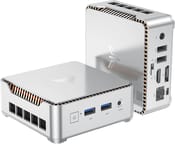
The KAMRUI Essenx E2 is a 100mm-square mini PC built around Intel’s Twin Lake N150, a four-core, four-thread chip with a 6W base TDP that boosts to 3.6 GHz. It ships in a single 16GB DDR4 / 512GB SATA SSD configuration with Windows 11 Pro pre-activated, aimed at the browsing-and-office workload the Intel N100 carried before it. The included VESA bracket lets it disappear behind a monitor; the rear panel hands you HDMI 2.0 and DisplayPort 1.4 for dual 4K@60Hz, gigabit Ethernet, two USB 3.2 Gen2 Type-A, and two USB 2.0 Type-A for keyboard and mouse.
The chassis measures 3.94 x 3.94 x 1.42 inches (100 x 100 x 40 mm) and 275 g, the same footprint class as Intel’s old NUC kits at a lower price. There is no USB-C anywhere on the device, the wireless radio is Wi-Fi 5 with Bluetooth 4.2 rather than the newer Wi-Fi 6 / BT 5.x found on the Beelink EQ12 tier, and the single M.2 slot caps the system at one drive. For light office work, media playback, classroom carts, and signage it lands at the right price; for sustained workloads or gaming, step up to a Ryzen-based mini such as the Beelink SER7.
| Pros | Cons |
|---|---|
| 100 x 100 x 40 mm chassis hides behind a monitor on the bundled bracket | Single SODIMM slot caps the system at 16GB DDR4 |
| Pre-activated Windows 11 Pro license; boots out of the box in under 10 s | Single M.2 slot; cannot run NVMe and SATA SSDs in parallel |
| Dual 4K@60Hz output via HDMI 2.0 + DisplayPort 1.4 | Stock SSD ships as SATA, so the first upgrade is a full drive swap |
| Quiet under load (39 dB idle, 42 dB stressed, measured by Techxreviews) | No USB-C and no Thunderbolt anywhere on the device |
| VESA bracket included; Gigabit Ethernet on the rear panel | Wi-Fi 5 and Bluetooth 4.2, a generation behind the 2026 baseline |
| Two USB 3.2 Gen2 (10 Gbps) ports for external NVMe enclosures | Twin Lake N150 is the slowest chip in Intel’s 2025 N-series |
Related Videos
KAMRUI Essenx E2 Comparison Chart
 KAMRUI Essenx E2 | KAMRUI Essenx E2 | |
| Price | List Price: Amazon Prices: | List Price: $279.99 Amazon Prices: |
| Version | 8GB/256GB/Intel N150 | 16GB/512GB/Intel N150 |
| Performance Rating | 4.3 | 4.9 |
| Operating System | Windows 11 Pro | Windows 11 Pro |
| Processor | Quad-core 3.60 Ghz Intel Processor N150 | Quad-core 3.60 Ghz Intel Processor N150 |
| GPU | Integrated Intel UHD Graphics | Integrated Intel UHD Graphics |
| RAM | 8 GB | 16 GB |
| Internal Storage | 256 GB | 512 GB |
| Dimensions width x length x thickness | 3.94 x 3.94 x 1.42 inches (100.08 x 100.08 x 36.07 mm) | 3.94 x 3.94 x 1.42 inches (100.08 x 100.08 x 36.07 mm) |
| Weight | 0.61 lbs (0.28 kg) | 0.61 lbs (0.28 kg) |
| WiFi | Wi-Fi 5 (802.11ac) | Wi-Fi 5 (802.11ac) |
| Bluetooth | Bluetooth 4.2 | Bluetooth 4.2 |
| Ethernet | 1 Ethernet port at 1 Gbps | 1 Ethernet port at 1 Gbps |
| HDMI | 1 Full-Size HDMI Port | 1 Full-Size HDMI Port |
| DisplayPort | 1 DisplayPort | 1 DisplayPort |
| VGA | No VGA Ports | No VGA Ports |
| USB Ports | 2 USB 2.0, 2 USB 3 | 2 USB 2.0, 2 USB 3 |
| Thunderbolt Ports | No | No |
| OCuLink | No | No |
| Internal SATA Ports | No SATA ports | No SATA ports |
| Card Reader | No Card Reader | No Card Reader |
| Headphone Jack | combo | combo |
| Fanless | No | No |
| VESA Mount | Yes | Yes |
| In the Box | Mini PC, power adapter, HDMI cable, VESA mounting bracket, user manual | Mini PC, power adapter, HDMI cable, VESA mounting bracket, user manual |
| Expandability | Up to 2TB M.2 SSD; RAM caps at 16GB DDR4 (single SODIMM). | Up to 2TB M.2 SSD; RAM caps at 16GB DDR4 (single SODIMM). |
Related Mini PCs
-
 KAMRUI AK1 Plus Mini PCThe KAMRUI AK1 Plus is a budget Intel N95 mini PC (also sold with N97 and N100 chips) with dual…
 -
 KAMRUI Essenx E1The KAMRUI Essenx E1 is a 3.94-inch square mini PC with an Intel N97 or N150, 8GB or 16GB of RAM,…
 -
 AWOW AK10The AWOW AK10 is an Intel N100 mini PC with 8GB of soldered DDR5, a 256GB SSD in an M.2 slot that…
 -
 Beelink Mini SA compact Celeron N5095 mini PC with dual 4K HDMI outputs, a swappable M.2 SSD plus a 2.5-inch…
 -
 Bmax B1 PlusThe Bmax B1 Plus is an ultra-budget mini PC on Intel's 2016 Celeron J3355, with 6GB of soldered…
 -
 Bmax B3The Bmax B3 is a small Intel Celeron N5095 mini PC with two HDMI outputs, two gigabit Ethernet…
A 6W chip, one M.2 slot, and no USB-C
The N150 is the entry rung of Intel’s 2025 N-series, sitting below the N250 and N350 that target chassis with more thermal headroom. In the E2’s 100mm-square shell with a single 2300 RPM fan, the N150 has just enough room to hold its boost on typical mixed workloads (Office, Edge with a dozen tabs, a 4K video on the side) without thermal throttling. Intel UHD Graphics on the same die handles dual 4K@60Hz on HDMI 2.0 + DisplayPort 1.4 for static workloads. It is not meaningfully a gaming part: contemporary written reviews report sub-30 FPS even in undemanding titles like Counter-Strike 2 and Team Fortress 2.
The single SODIMM slot tops out at 16GB DDR4, in either the earlier 8GB build or the current 16GB configuration. The single M.2 2280 slot accepts both SATA and PCIe drives up to 2TB, but only one drive at a time, so moving from SATA to NVMe replaces the stock drive instead of adding to it. That stock drive is SATA, and Techxreviews points to an NVMe swap as the most cost-effective upgrade.
The port stack is dense for a 100mm box. The rear panel carries two USB 3.2 Gen2 Type-A (10 Gbps), gigabit Ethernet, HDMI 2.0, and DisplayPort 1.4. The front edge has two USB 2.0 Type-A for keyboard / mouse and a 3.5mm combo audio jack. The HDMI + DP pairing delivers dual 4K@60Hz; for triple-display you would have to give one screen up to a USB-DisplayLink dongle since there is no USB-C with DP-Alt. Wi-Fi 5 and Bluetooth 4.2 work for everyday browsing and a wireless mouse, but the radio is a generation behind what is standard in 2026 mini PCs.
Reviewer Insights
Tech Brothers YouTube review
Tech Brothers’ 13-minute teardown and benchmark walks through the chassis (locking rear panel for SSD / RAM access), thermal behaviour, and a productivity-leaning workload mix. The reviewer confirms the N150 holds 3.4 to 3.6 GHz on short bursts and settles in the high 2 GHz range under sustained Cinebench load, with fan noise audible but not intrusive. They call it adequate for browsing, document work, and 1080p media.
Techxreviews: “Affordable and Compact Mini PC at $169”
Moussa Obscur’s Techxreviews piece (published 2025-03-28) measured fan noise at 39 dB during normal use and 42 dB under load, with the unit weighing 275 g and measuring 100 x 100 x 40 mm. He rated the chassis and quiet operation well while stating the ceiling plainly: “the Intel N150 isn’t going to blow anyone away; it’s the slowest chip in Intel’s Twin Lake lineup, but it gets the job done for everyday tasks.” Gaming was specifically called out as a weak spot, with Team Fortress 2 described as “laggy and unpleasant” and Counter-Strike 2 underperforming. The review also records that the stock SSD is SATA, and the reviewer suggested an NVMe swap as the most cost-effective upgrade.
The Inside Review: pros, cons, and rumours debunked
The longer (~1,800-word) piece from choitoippai (April 2025) confirms boot times under 10 seconds with the pre-activated Windows 11 Pro license and “whisper-quiet” thermals at the 15W package. The M.2 layout is single-slot only (a small number of early listings implied two), so plan an upgrade as a one-shot drive swap rather than dual-drive expansion. The integrated GPU also fails to initialise headless on Ubuntu 24.04 stock kernels because it lacks the Twin Lake-N driver entries, with a fix landed in kernel 6.11 and later. A 6.11+ kernel is required for headless Linux use (current Fedora and Pop!_OS qualify; Ubuntu 24.04 LTS does not until a hardware-enablement stack lands).
Best as a quiet office, classroom, and media box
The M.2 2280 slot takes a drive of up to 2TB, the one upgrade path that stays open after purchase, while the single SODIMM leaves the 16GB of DDR4 as-shipped. That suits a home office desk, a classroom cart, or a living-room media box for streaming and light computing. Anyone cross-shopping a Raspberry Pi for a low-cost desktop will find our list of the mini PCs that replace the delayed Pi 6 a useful comparison.
Gaming, video editing, and other sustained workloads are past what a 6W four-core chip and a 2300 RPM fan can carry, and the Wi-Fi 5 radio lags what current minis ship. Buyers who need either should price a Ryzen-based box instead. Starry Hope’s Mini PC Comparison Tool puts this machine’s specs next to those alternatives.
Frequently Asked Questions
Can I upgrade the RAM and storage on the KAMRUI Essenx E2?
The currently shipping configuration is already 16GB DDR4, and the single SODIMM slot caps the system there. Storage is more flexible: the M.2 2280 slot accepts SATA or PCIe drives up to 2TB. Note that the slot is single, not dual: a SATA-to-NVMe swap replaces the stock drive rather than adding alongside it.
Does the KAMRUI Essenx E2 support dual monitors?
Yes. HDMI 2.0 and DisplayPort 1.4 drive two screens at 4K@60Hz each. A third display needs a USB-DisplayLink dongle, since the box has no USB-C with DP-Alt mode.
Is the KAMRUI Essenx E2 good for gaming?
No. The Intel UHD Graphics on the N150 die handles basic graphical tasks and light applications, but it is unsuitable for modern gaming or graphically intensive programs.
Does it come with Wi-Fi and Bluetooth?
Yes, Wi-Fi 5 and Bluetooth 4.2. Both handle browsing and a wireless keyboard and mouse, but they sit a generation behind the Wi-Fi 6 and Bluetooth 5.x radios in comparable minis, so heavy wireless file transfers will feel slow.
Is the KAMRUI Essenx E2 noisy?
It uses a single 2300 RPM fan rather than a fanless design. Independent measurements from Techxreviews put it at 39 dB at idle and 42 dB under sustained load, which is audible in a quiet room but rarely disruptive next to a monitor. Heavier multitasking nudges the fan up but the chassis stays well clear of laptop-fan territory.
What comes in the box with the KAMRUI Essenx E2?
The current 16GB / 512GB package ships with the Mini PC itself, the power adapter, a short HDMI cable, a VESA mounting bracket, and the user manual. The bracket lets you attach the chassis to the rear of a VESA-compatible monitor for a clutter-free desk.
Can I use the KAMRUI Essenx E2 as a media center?
Yes. The 100mm chassis hides behind a TV on its VESA bracket, and the N150 handles streaming and 4K@60Hz playback. Heavy media processing such as transcoding or video editing is past what the chip will do comfortably.
Does it have a card reader?
No, the KAMRUI Essenx E2 does not include a built-in card reader. If you need to transfer data from SD cards or similar devices, you’ll need to use an external card reader.